O in short: r team calendars in outlook by making them show only relevant information. What if you had company wide calendars: with only the items related to a certain client; with veryone's vacation tieasy
|
 Categories Categories |
|
|
|
|
|
Exchange GroupCalendar 3.0 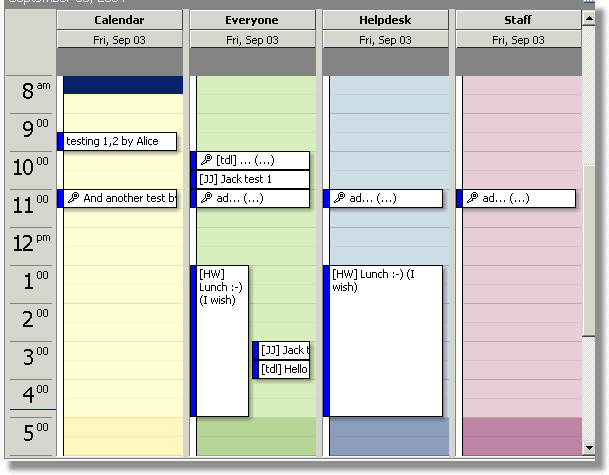
Click to enlargeDescription:Wouldn't it be nice to have one overview of your team's meetings and appointments in Outlook that matter to you without all the non-relevant information? What if you had company wide calendars: with only the items related to a certain client; with everyone's vacation time; that shows when the night shift roster has a vacancy; to manage your team of technicians on the road with real-time feedback from their smartphones; Without ever having to double enter information? What if you could: create one item in a team calendar, and it would be copied to 300 user calendars instantly without any invitations and responses; share items with colleagues on your phone calendar that change for everyone when edited; make sure that everyone uses the same centrally managed category/color combination to label their meetings and appointments; manage everyone's personal calendar from one location in Outlook? Without users having to configure anything! No (delegate) permissions to manage or add-ins to install. The Group Calendars are simply there and show what is required and nothing more.
 | Price $ 1 /

Purchase Exchange GroupCalendar
Get it Now(to see additional options, click Buy Now) Type: Shareware File size: 853 Kb Date: 06/01/2018 HomepageInstall support: Install and Uninstall OS: Win2000, WinXP, Win7 x32, Win7 x64, Windows 8, Windows 10, WinServer, WinOther, WinVista, WinVista x64 System requirements: Exchange server any version Language: English, Italian Recent changes in this Major Update: | |
|





