O in short: o scanning of your old photos. Easily scan multiple photos at once with this scanner software. Automatically detect and straighten your photos then save them to separate image files. Save baffordable
|
 Categories Categories |
|
|
|
|
|
ScanSpeeder 3.25 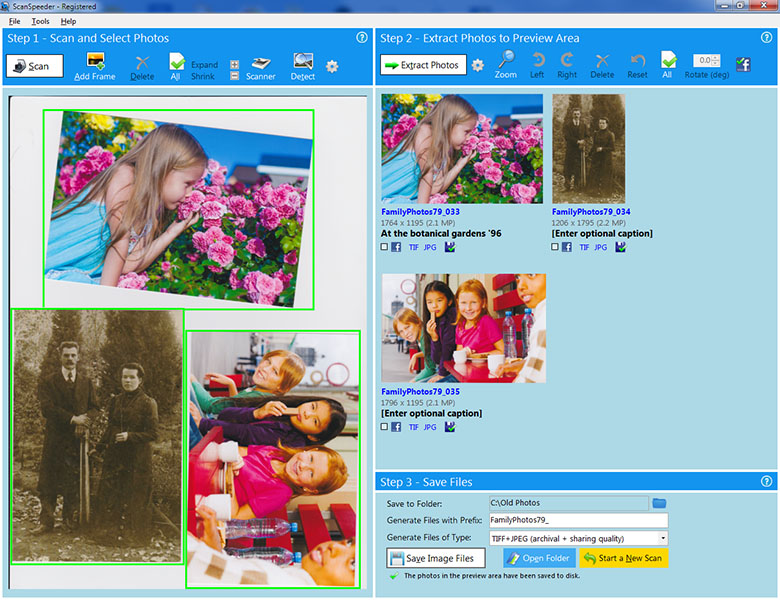
Click to enlargeDescription:Photo scanning has never been easier and faster than with this scanner software. Easily scan multiple photos by placing as many of your old photos as you can fit on your flatbed scanner. Your photos are automatically detected and straightened, then saved to separate image files. Scan prints, negatives and slides. Magic wand removes unwanted tint with one click. Deep color 48-bit scanning ensures your photos are ready to display on the next generation of monitors and TV's.
Simplified interface and streamlined workflow minimizes what you need to do, making photo scanning even faster.
Features:
- Best-in-class automatic photo detection and straightening algorithm makes your project much easier
- Scan prints, negatives and slides
- Also scan documents, receipts and cards with OCR (text recognition)
- Scan from photo feeder and document feeder
- Maximize color accuracy and future readiness with 48-bit Deep Color scanning
- Get the most from your black and white photos with 16-bit True Gray scanning
- Tag and imprint text on photos to preserve written comments and date taken to help you find them later
- Save both archival/editing and sharing/slideshow quality at the same time
 | Price $ 29.95 /

Purchase ScanSpeeder
Get it Now(to see additional options, click Buy Now) Type: Shareware File size: 13859 Kb Date: 04/05/2023 HomepageInstall support: Install and Uninstall OS: Win2000, WinXP, Win7 x32, Win7 x64, Windows 8, Windows 10, WinServer, WinOther, WinVista, WinVista x64 System requirements: Windows 10, 11, 7, 8.1, 8, Vista. 35 MB drive space. Language: English Recent changes in this Major Update:Fine rotate frames in Step 1 using arrow keys
1. Select one (left-click) or more (control-left-click) frames
2. Hover over selected frame until you see the rotate arrows, then left or right arrow to fine rotate
Fixed photos not appearing in Step 2 for certain Windows display scaling settings | |
|





