O in short: Converter is able to help you convert popular video format to iPad MOV M4V MPEG-4 H.264/MPEG-4 AVC etc. video formats.reliable
|
 Categories Categories |
|
|
|
|
|
Tipard iPad Video Converter 7.0.38 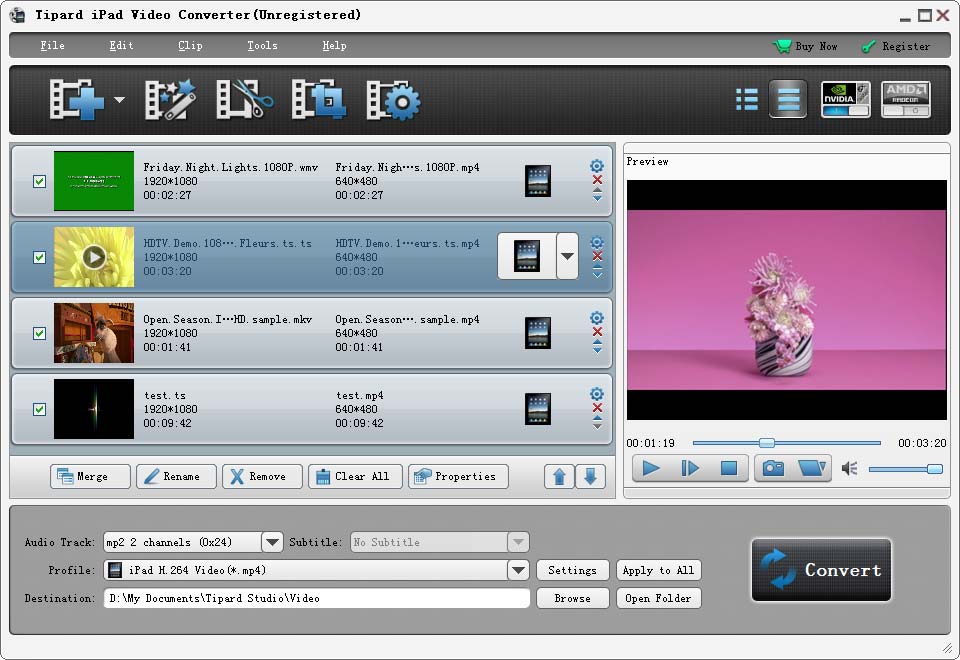
Click to enlargeDescription:Tipard iPad Video Converter has the ability of converting popular video formats to iPad MOV, M4V, MPEG-4, H.264/MPEG-4 AVC, etc. video formats and AAC, MP3, WAV, AIFF, M4A, etc. audio formats. Tipard iPad Video Converter provides you with powerful editing functions, like trimming, cropping, merging and watermarking. What's more, it highly supports iPhone 5s/5c, iPad mini 2, iPad Air. key functions 1.Convert video files to iPad Tipard iPad Video Converter can help you convert all kinds of video and audio formats to all iPads ( such as iPad 4, iPad mini and so on ) support formats, including H.264/MPEG-4 AVC, MOV, M4V, MPEG-4 video formats. 2.Get audio formats It enables you to get audio formats, such as AAC, MP3, WAV, AIFF, M4A, etc. 3.Set video effect This useful software enables you to adjust video effect: Brightness, Contrast, and Saturation. 4.Crop With this crop function, it can cut off black edges and unwanted playing area and choose your preferred image Aspect Ratio to fit your portable devices. 5.Add watermark Add a text/image watermark to the source video. Also you can set its position and transparency. 6.Trim Trim any segment of a video by setting its start and end time or just dragging the slide bar. 7.Merge several videos into the one It can help you merge several titles or chapters of video into one file for output, so that you'll enjoy a single long movie with a single click. 8.Adjust output video and audio parameters You can adjust the Video Encoder, Resolution, Frame Rate, Video Bitrate, the Audio Encoder, Sample Rate, Channels, Audio Bitrate. Besides, you also can save all the output settings as your preference. 9.Easy interface This Tipard iPad Video Converter supports English/French/German/Japanese four interface languages, it is very easy for new users, for just few clicks will finish the process of converting.
 | Price $ 29.00 /

Purchase Tipard iPad Video Converter
Get it Now(to see additional options, click Buy Now) Type: Shareware File size: 23449 Kb Date: 02/23/2014 HomepageInstall support: Install and Uninstall OS: Win2000, Win7 x32, Win7 x64, WinOther, WinVista, WinVista x64, WinXP, Other System requirements: 1.2GHz Intel or AMD CPU, or above; 1G RAM or more. Language: English Recent changes in this Major Update:Highly compatible with iPhone 5s/5c, iPad mini 2, iPad Air. | See also in:
| Multimedia and Productivity: Multimedia and Productivity:Video Editors Mixers Conversion | |  | An ultimate video and audio format converter which supports converting APE, CUE, CDA, h.264, MPEG, AVI, MPG, DVD, VCD, WMV, MP4, MOV, 3GP, DivX, animated GIF, RM and ASF etc to MPEG and AVI. |
| |  | Video and audio converter which supports DVD, VCD, SVCD, VOB, AVI, DV, MOV, animated GIF, swf, MPEG4, RM, WMV, ASF, WAV, WMA, MP3, 3GP, m4a, mp4, h264, raw YUV, MP2, ogg, m4v etc. It allows users to convert any segments and supports multi-language |
| |  | Tipard HD Video Converter can convert HD video to MP4, MKV, AVI, WMV, MOV, M4V and more. It also can convert 4K videos to 4K video like 4K H.264 TS, 4K AVI, and 1080p HD video files to HD MOV, HD AVI, HD WMV, HD MP4. It is compatible with windows 10. |
|
|
|





