
|

|
Flashnote 2.3 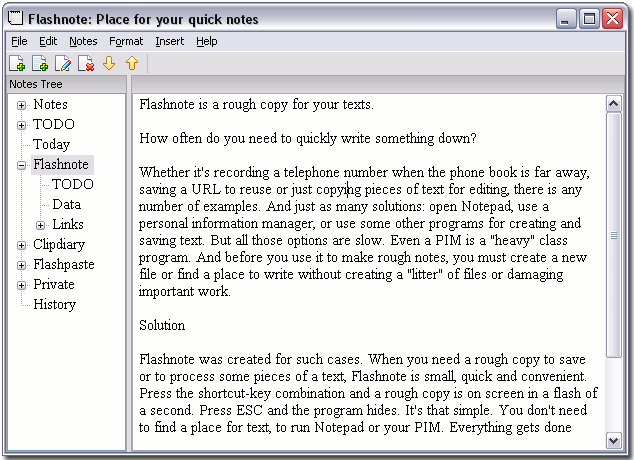 Click to enlarge Description: How often do you need to quickly write something down? Whether it's recording a telephone number when the phone book is far away, saving a URL to reuse or just copying pieces of text for editing, there is any number of examples. And just as many solutions: open Notepad, use a personal information manager (e.g. My Notes Center), or use some other programs for creating and saving text. But all those options are slow. Even a PIM is a "heavy" class program. And before you use it to make rough notes, you must create a new file or find a place to write without creating a litter" of files or damaging important work. Flashnote is absolutely free. Flashnote was created for such cases. When you need a rough copy to save or to process some pieces of a text, Flashnote is small, quick and convenient. Press the shortcut-key combination and a rough copy is on screen in a flash of a second. Press ESC and the program hides. It's that simple. You don't need to find a place for text, to run Notepad or your PIM. Everything gets done quickly, simply and in a more convenient way. Flashnote is not a personal information manager. Flashnote is not an electronic notebook. Flashnote is not a substitute for Notepad or some other text editor. Flashnote is a rough copy utility that can be used any time during work process and without fear of damaging important data. You'll find it a real help for your computer work. 
| (to see additional options, click Buy Now) Type: Freeware File size: 395 Kb Date: 04/07/2007 Homepage Install support: Install and Uninstall OS: WinXP, Windows2000, Windows2003 System requirements: not Language: English Recent changes in this New Release: Version 2.3: Added: Minimize on run Option. Fixed: Error that appeared after data is loaded from file without further editing ("Load from File")
|
 Categories
See above information and user's reviews about Flashnote Flashnote is just a rough copy for your quick work with any text information. | See also other good software: Multimedia and Productivity: Multimedia and Productivity:Wordprocessing, Desk Top Publishing, text editing  |


|
|

Contact us, report problems on this page - Submit software file - Advertise here - Questions / Info - Search - HomePage - Search good software
QUICK SHARE: del.icio.us digg facebook diigo reddit
QUICK SHARE: del.icio.us digg facebook diigo reddit
This site is managed with 1SITE (the Website creator software) Only original products, good and easy to use best software.

|