O in short: mpering with your PC. Password protect and deny access to Windows restrict running applications lock local network and USB drives control Internet usage view statistics of working of yowonderful
|
 Categories Categories |
|
|
|
|
|
Security Administrator 14.0 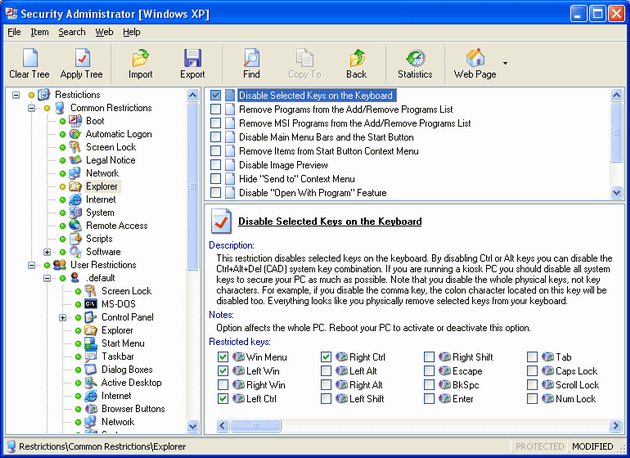
Click to enlargeDescription:Restrict access to your PC with Security Administrator. This password-protected security utility enables you to impose a variety of access restrictions to protect your privacy and stop others from tampering with your desktop. You can deny access to each individual component of several Control Panel applets, including Display, Network, Passwords, etc. You can disable your boot keys, context menus, DOS windows, Registry editing, and network access. Hide your desktop icons, local, network and USB drives, Start menu items, or even the entire taskbar. You can also apply password protection to Windows and restrict users to running specific applications only, control Internet usage, view statistics of working of your kids or employees. Security restrictions can be applied universally or to specific users. You'll find the program interface very easy to negotiate. Excellent documentation is available.
 | Price $ 69 /

Purchase Security Administrator
Get it Now(to see additional options, click Buy Now) Type: Shareware File size: 1935 Kb Date: 11/21/2013 HomepageInstall support: Install and Uninstall OS: Win98, WinME, WinNT 3.x, WinNT 4.x, Windows2000, WinXP, Win7 x32, Win7 x64, Windows2003, Windows Vista Starter, Windows Vista Home Basic, Windows Vista Home Premium, Windows Vista Business, Windows Vista Enterprise, Windows Vista Ultimate, Windows Vista Home Basic x64, Windows Vista Home Premium x64, Windows Vista Business x64, Windows Vista Enterprise x64, Windows Vista Ultimate x64 System requirements: n/a Language: English Recent changes in this Major Update:Major bug fix | |
|





