Disclaimer: to our best knowledge this download comes from a website that is
safe (the last time we checked it, it was), but for your peace of mind (and better safe than sorry) we advise you to run an
antivirus on the downloaded file. Do not rely on MSWindows, Internet explorer, or on the electronic signature: a unsigned download is usually as safe as a signed one, signed just means the author paid Microsoft or Verisign for a stamp, it does not mean verified. Please kindly
report us problems with detail (click here to report), if any.
Diagram Studio offers you a wide choice of different tools which allow you to quickly and easily create flowcharts, business and technical diagrams, schemes, plans, etc. It contains many features else found only in very expensive packages, like automatic formatting and routing, rotation, customizable toolbars, professional color styles, graphics import and export, curves, flexible text support, and a library of ready-made symbols and templates.
(
Professional user-friendly program for creating business and technical drawings.)
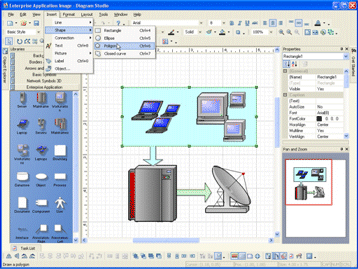
Diagram Studio offers you a wide choice of different tools which allow you to quickly and easily create flowcharts, business and technical diagrams, schemes, plans, family tree, etc. The focus of these tools is on ease-of-use, speedy results, automation, and quality output.
Diagram Studio contains many features else found only in very expensive packages, like automatic formatting and routing, rotation, customizable toolbars, professional color styles, graphics import and export, curves, flexible text support, and a library of ready-made symbols and templates. Diagram Studio supports Object Linking and Embedding in Windows as an OLE Server. This feature makes it very easy to use Diagram Studio drawings in other Windows programs. You can embed or link your diagram. In both cases, you can edit the diagram by double-clicking it in the destination application.
It's easy to draw and edit charts with Diagram Studio. You don't need to have any artistic talent or drawing skills to use this program. The simple objects can be easily created by using primitive graphic components, and for more complicated ones you can use our Libraries, supplied with the program, where most of the objects you might need are already gathered for you. Simply drag them from there and drop into your diagram. Diagram Studio includes many ready-made symbols that are carefully organized into Libraries designed for specific tasks. For each symbol, you can assign different line colors, pattern, fill and shadow colors. You can enter explanatory text label at any location. Text is entered and formatted just like your word processor does it.
Diagram Studio's intelligent links automatically change their path when you reposition objects, avoiding crossing other objects. Powerful grid and alignment aids keep your diagram attractive. Diagram Studio handles the hard parts of drawing a diagram and leaves you time to focus on the layout and appearance.
Get it now!
diagram program, chart program, flow program, flowchart program, flowcharting program, organization program

 Click here to start the download