O in short: watermark from video easily ! Remove logo from video and make it unnoticeable. Multilingual. You can specify the exact watermark area and also the exact time position where the watermark isreliable
|
 Categories Categories |
|
|
|
|
|
Video Watermark Remover 3.0 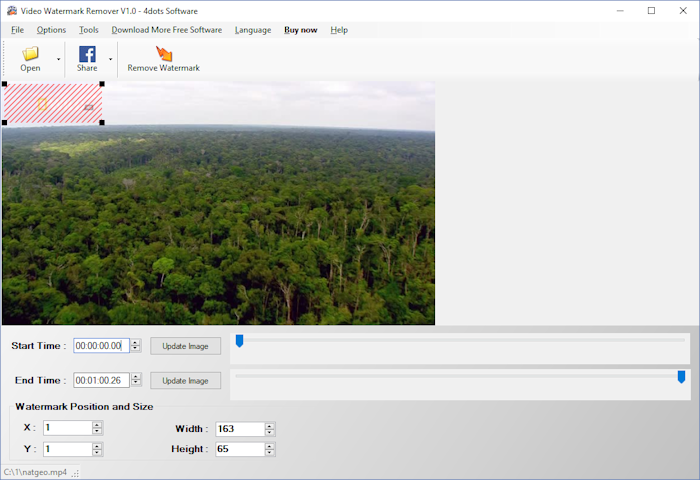
Click to enlargeDescription:Do you want remove watermark from video such as logos, signatures, subtitles ? Then try this watermark remover software application. It will remove logo from video and make it unnoticeable. You can specify the exact watermark area and also the exact time position where the watermark is appearing. Just select the area where the watermark on the preview screen and the start and end time position of the video where the watermark is being showed. Then press the "Remove Watemark" button, select the output format and the video without the watermark will be generated immediately. You can remove multiple watermarks that are on different time positions at once ! Video Watermark Removerhas a large number of different output formats and output profiles, including profiles for Android, Iphone, Ipod, PSP, XBOX, H265, MP4, AVI, Xvid, DVD e.t.c. You can specify the output format and different encoding options directly and you can also normalize the output audio, mix or replace the audio of the join with another audio file, draw text on the combined video, draw scrolling text on the merged video. The application supports drag-and-drop actions and is very easy to use. The application is also multilingual and translated into 39 different languages.
 | Price $ 9 /

Purchase Video Watermark Remover
Get it Now(to see additional options, click Buy Now) Type: Shareware File size: 33425 Kb Date: 09/16/2018 HomepageInstall support: Install and Uninstall OS: Win2000, WinXP, Win7 x32, Win7 x64, Windows 8, Windows 10, WinServer, WinOther, Windows2000, Windows2003, Windows Server 2012, Windows Tablet PC Edition 2005, Windows Media Center Edition 2005, WinVista, Windows Vista Starter, Windows Vista Home Basic, Windows Vista Home Premium, Windows Vista Business, Windows Vista Enterprise, Windows Vista Ultimate, WinVista x64, Windows Vista Home Basic x64, Windows Vista Home Premium x64, Windows Vista Business x64, Windows Vista Enterprise x64, Windows Vista Ultimate x64 System requirements: .NET 2.0 installed Language: English, Arabic, ChineseSimplified, Croatian, Czech, Danish, Dutch, Estonian, Finnish, French, Georgian, German, Greek, Hebrew, Hindi, Hungarian, Icelandic, Indonesian, Italian, Japanese, Korean, Latvian, Lithuanian, Norwegian, Polish, Portuguese, Romanian, Russian, Slovak, Slovenian, Swedish, Thai, Turkish, Ukrainian, Vietnamese Recent changes in this New Release:Ability to remove multiple watermarks Option to use FFMpeg 64bit or FFMpeg 32bit Minor GUI Improvements Fixed bug : Videos with start and end time being set were not being generated correctly Minor GUI bug fixes | See also in:
| Multimedia and Productivity: Multimedia and Productivity:Video Editors Mixers Conversion | |  | An ultimate video and audio format converter which supports converting APE, CUE, CDA, h.264, MPEG, AVI, MPG, DVD, VCD, WMV, MP4, MOV, 3GP, DivX, animated GIF, RM and ASF etc to MPEG and AVI. |
| |  | Video and audio converter which supports DVD, VCD, SVCD, VOB, AVI, DV, MOV, animated GIF, swf, MPEG4, RM, WMV, ASF, WAV, WMA, MP3, 3GP, m4a, mp4, h264, raw YUV, MP2, ogg, m4v etc. It allows users to convert any segments and supports multi-language |
| |  | Tipard HD Video Converter can convert HD video to MP4, MKV, AVI, WMV, MOV, M4V and more. It also can convert 4K videos to 4K video like 4K H.264 TS, 4K AVI, and 1080p HD video files to HD MOV, HD AVI, HD WMV, HD MP4. It is compatible with windows 10. |
|
|
|





