O in short: derMill monitors a folder and automatically prints or converts to PDF JPG or TIFF all new documents. Just define hot folders to watch and set actions to perform. Let all office employees towonderful
|
 Categories Categories |
|
|
|
|
|
FolderMill 2.1 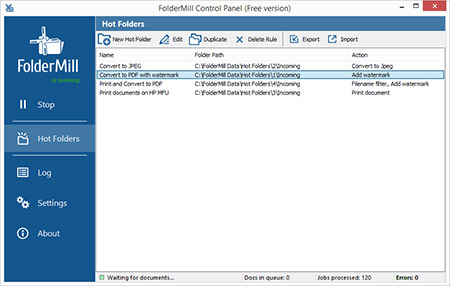
Click to enlargeDescription:FolderMill monitors a folder and automatically prints or converts to PDF, JPG or TIFF all new documents and image files. System administrator defines "hot folders" for watching and set actions to perform. After this all employees in the office will be able to print or convert documents as simple as copying files! There is no need to install any additional software applications on the end-user computers. FolderMill ensures conversion of all the incoming files to PDF, JPG or TIFF with very few efforts: simply by placing the documents into one folder and taking them out from another one! To print the documents all the company employees need to do is to place them into one of the "hot folders". There is no need to open every file individually, select the printer and specify printing parameters. No printer driver installation is required either. All the documents will be printed based on the same printing standards, for example, "Page size = Letter; Tonner using mode = Economical; Color mode = Grayscale; Number of copies = 2". Additionally, to print several documents in a row the user needs to place them all into the "hot folder" instead of opening and printing every single file individually. This is really a time saving feature for people who need to print tons of documents daily. FolderMill supports all popular types of office documents including Microsoft Office Word files, RTF and plain text documents, Excel files, PowerPoint presentations, Visio drawings and charts, Microsoft Office Publisher and Adobe PDF files, XPS, JPG, PNG, PCX, DCX, Bitmap, GIF, TGA, TIFF images and documents. The list of supported printers includes desktop laser and jet printers connected to the laptop via USB or Wi-Fi, high-performance network printers used in offices, plotters and virtual printers use for virtual document printing to PDF, Postscript and image files.
 |
(to see additional options, click Buy Now) Type: Freeware File size: 41224 Kb Date: 03/24/2015 HomepageInstall support: Install and Uninstall OS: Win7 x32, Win7 x64, Win98, WinVista, WinVista x64, WinXP System requirements: Pentium 4, 256 MB RAM, Windows 8 supported Language: English Recent changes in this New Release:Native TXT to PDF conversion is implemented; extended log files; new PowerPoint component for print and convert PPT and PPTX files; new formats are now supported for print and convert: Photoshop PSD, Windows Metafiles and Enhanced Metafile. | See also in:
| Business and Finance: Business and Finance:Miscellaneous and all-in-one | |  | Word Viewer is an easy-to-use Free Word Viewer,You can read Word 2010,2007,Word 97~2003,html,txt,rtf. You can convert Word 2007(docx),Word 97~2003(doc),Txt,Html,Rtf to PDF,DOCX,DOC.It is a multilingual software. |
|
|
|





