O in short: his is a more powerful version of Medical Calendar with all of the features of the standard version but with the additional capability to share data in real time over the network. The ideal alternataffordable
|
 Categories Categories |
|
|
|
|
|
Medical Calendar for Workgroup 3.8 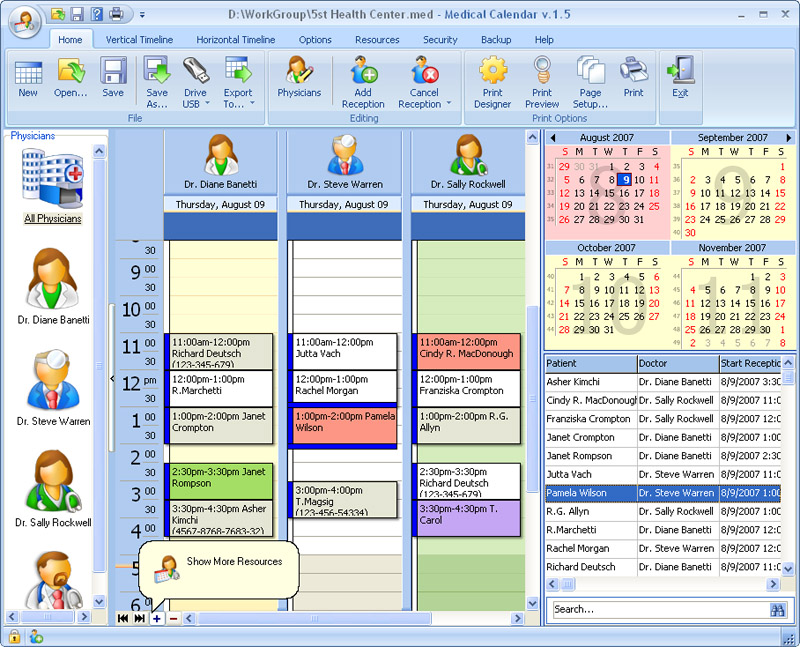
Click to enlargeDescription:This is a more powerful version of Medical Calendar, with all of the features of the standard version, but with the additional capability to share data in real time over the network. This handy scheduling software will suit perfectly for a single physician as well as for a whole health center. It will help you to quickly create a competently organized schedule for the whole staff. If you want to have your reception hours at hand and don't want to miss any important job-related events, then Medical Calendar is just what the doctor ordered! Medical Calendar is delivered in a classy interface both intuitive and stylish, making schedule management a piece a cake. Each doctor can create a profile to run his personal schedule. You can instantly switch between profiles to view the schedule of any specialist at any given moment. For your convenience Medical Calendar also allows viewing multiple profiles at a time, to view the schedules of several or even all doctors simultaneously. The creators of Medical Calendar have done a great job in crafting the Date Navigator that makes the scheduler extremely easy-to-use. At any time you can jump to the required date, edit reception hours, patient data, etc. You can change time intervals from a detailed day schedule to a brief quarter overview in order to provide yourself with the most fitting schedule. What's more, you can choose vertical or horizontal timelines. All information stored in Medical Calendar can be secured with a password preventing from unauthorized access. To safeguard your data, you can also take advantage of the adjustable Auto Backup feature and save the data to the secured archive. Additionally, the schedule can be exported to a variety of formats, including MS Outlook, XML, HTML, XLS, TXT, PDF. When you need a printout of your schedule, you'll certainly appreciate the powerful Print Designer. You pay for the program only the first time and get all new versions of this program for FREE and for a lifetime!
 | Price $ 69.95 /

Purchase Medical Calendar for Workgroup
Get it Now(to see additional options, click Buy Now) Type: Shareware File size: 33581 Kb Date: 06/14/2011 HomepageInstall support: Install and Uninstall OS: Win2000, Win7 x32, Win7 x64, Win98, WinServer, WinVista, WinVista x64, WinXP System requirements: 32 MB of RAM, 7 MB of available hard disk space. Language: English Recent changes in this Major Update:This release includes minor fixes and enhancements. | See also in:
| Business and Finance: Business and Finance:Miscellaneous and all-in-one | |  | Word Viewer is an easy-to-use Free Word Viewer,You can read Word 2010,2007,Word 97~2003,html,txt,rtf. You can convert Word 2007(docx),Word 97~2003(doc),Txt,Html,Rtf to PDF,DOCX,DOC.It is a multilingual software. |
|
|
|





