

Soft14.com download shareware freeware software app trial free commercial program download Windows, Linux, Mac, Apple, Android, Smartphones, iPod, iPad, OSX, video mobile phone best and good
 
CategoriesLast 20 searchesSoftware HousesInformation - Link exchange download software
Active Tray Everything the System Tray should have been, but never was – until NOW.
Create your own personal professional Website websight with Easy Web Editor...

Active Tray 2.0
[Homepage] - by: Divcom Software - Download links
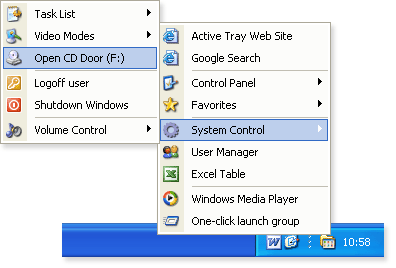
Everything the System Tray should have been, but never was – until NOW.
Click to enlarge

Description:
For most PC users, the Windows System Tray is used to occasionally check the date and time, and, more rarely, to run a program or two. Yet, this relatively small area of screen real estate has always had the potential to revolutionize the Windows Desktop, making it a pivotal tool for increasing productivity and performance.
Enter “Active Tray”, the Windows System Tray “Super-Charger”! Now the System Tray can truly become what it was always meant to be.
Active Tray lets you launch a favorite website, open a folder, or configure a hotkey for rapid access to a program. Imagine being able to create cascading popup menus containing your most important tasks! You can even add password protection and balloon tips to those popup menu shortcuts.
Each tray icon can now have individually defined settings, as can each popup menu. You can also change the overall appearance of the tray (icons, menus, separators, etc).
Active Tray is extremely intuitive; being both easy to learn and easy to use. It even comes with its own balloon tips support, and Windows XP users will appreciate the program’s support for Windows XP themes.
The program has received excellent reviews from AllFiles.com, File Transit, Download Blast, and many other respected software review websites. Don’t pass up this opportunity to download your free trial copy today, and see why so many others are raving about Active Tray!

Recent changes in this New Release:
Added the ability to add items to the Active Tray configuration by using drag-and-drop. New Action item type added. New commands in the Active Tray menu to add, remove, and edit tray icons directly from the system tray. Added the ability to import/export the user's items configuration. The Active Tray window is now resizable. Added the ability to define a sound to be played for some events. Added the ability to define the position of a cascading menu which is called by the keyboard shortcut. New customizable keyboard shortcuts for the program. The Menu item type is renamed to Menu or Group, and can now not only expand its contents in a cascading menu but also launch all the items it contains. The format of language files is changed to plain text .INI. Also, minor bugs fixed and some improvements made.

Download:
Download links

Price $ 24.95 / EUR 24.95
Buy Now!

Purchase - Get it Now


Comments (Add comment)


Type: Shareware
Price $ 24.95 / EUR 24.95
Buy Now!

Purchase - Get it Now

File size: 1288 Kb
Date: 09/14/2004
Homepage
Install support: Install and Uninstall
OS: Win95, Win98, WinME, WinXP, WinNT 4.x, Windows2000
System requirements: High Color display mode
Language: English


Desktop Themes: Desktop Themes:Miscellaneous

Click here for download / more info about Parallels Workstation for Linux Desktop_Themes Miscellaneous
Parallels Workstation enables users to run multiple operating systems, including Windows, Linux, FreeBSD, OS/2, eComStation, Sun Solaris and MS-DOS, simultaneously on one physical machine without partitioning or rebooting.

Click here for download / more info about Neo Matrix 3D ScreenSaver Desktop_Themes Miscellaneous
Neo Matrix 3D screensaver brings your consciousness to the higher levels of reality where you can find yourself in the endless pseudo matrix 3D alien tunnels spinning and wirling around to change your perception of the earth environment.

Click here for download / more info about Uranium Desktop Desktop_Themes Miscellaneous
Uranium Desktop lets you automatically rotate your wallpapers in 2 easy steps: First you specify one or more folders where your wallpapers are located. Second, you set the time interval, ranging from every few minutes to every month.

Click here for download / more info about TuneUp WinStyler Desktop_Themes Miscellaneous
TuneUp WinStyler lets you change the way Windows looks on your computer. You can change the look of the complete desktop easily. The start menu, taskbar, even the panels and windows of all modern applications get a new look with the click of a button

Click here for download / more info about Theme Manager Desktop_Themes Miscellaneous
Control the OVER ALL look of your Windows computer with Theme Manager. Manage all your skins, themes, wallpapers, icons, etc. from a single interface. You can even mix and match them together to create full blown suites!

Click here for download / more info about Just Watching Desktop_Themes Miscellaneous
Imagine that you could continuously monitor multiple online images without having to open your browser! Use Just Watching to build a custom wallpaper that can display web cams, stock charts, weather maps and home security cams right on your desktop!


Keep yourself updated, subscribe to the soft14 Newsletter now, its free! Enter your email here:

Search Soft14:
Search: the Web within this Web site
Google
 
Create Web CD DVD product business catalog ecommerce... create ebook
create website
finance, gold

Software Programmi Shareware Freeware Italiano Acquista Compra Scarica Downloadfree games

This site is managed also with EasyWebEditor (the Website creator software) Original products, good, professional, easy to use software.
(C)2002, 2014 Soft14.com, Site14.com
Download the best simple quick productive personal and business software tools. Windows, MAC, Linux, Android, Smartphone... Shareware, professional programs, discounts, best price.
Programmi gratislyrics testo parolescreen saverrecensioni librigiochi gratis


