O in short: le Apps backup tool has advanced features that help user to create backup of Google Apps folders including emails contacts calendars documents from Google Apps domain users account.well known
|
 Categories Categories |
|
|
|
|
|
Google Apps Backup Tool 3.0 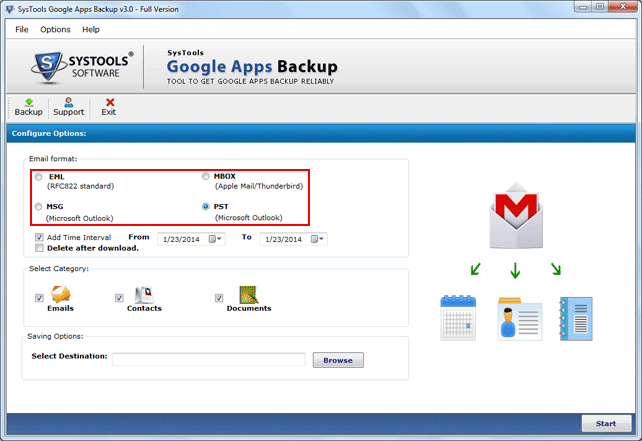
Click to enlargeDescription:If you use Google Apps services like emails, contacts, calendars, documents and you have stored critical data in Google Apps account and need to create backup of Google Apps to prevent data loss situation, then you should use Google Apps backup tool which is an easy and professional way to create backup of your Google Apps folders including emails, contacts, calendars, documents from domain users account and you can save or store the Google Apps data to a local drive by using it. Using this reliable application, you can convert emails to PST, EML, MSG or MBOX format, contacts to vCard (. vcf) file format, calendars to ICS file format & documents to MS-Office or other filr format file format. Google Apps backup tool has powerful features like Single User , Multi-User backup, Date Based Backup and Delete after Download. Our software successfully runs on all Windows platforms. Try demo version that facilitates you create Google apps backup of 100 email & 25 other items without any charge and if you want to take complete backup then purchase full version of Google Apps Backup Tool which is available at $49 limited up to 5 users.
 | Price $ 49 / 39

Purchase Google Apps Backup Tool
Get it Now(to see additional options, click Buy Now) Type: Shareware File size: 17326 Kb Date: 03/04/2014 HomepageInstall support: Install and Uninstall OS: Win2000, Win7 x32, Win7 x64, WinServer, WinVista, WinVista x64, WinXP System requirements: Intel® Pentium® 1 GHz processor, 512 MB of RAM, Minimum 18 MB Space Language: English Recent changes in this Major Update:Updated Version 3.0 of Google Apps Backup | See also in:
| Utilities and Hardware: Utilities and Hardware:Backup | |  | Any Outlook Backup is a backup and restore tool for the Microsoft Outlook. It allows you to save Personal Folders, Contacts, Personal Address Book, Mail folders, Mail accounts, Message rules, signatures, stationery, tasks, notes, calendar, Templates. |
|
|
|





